Find in this Blog

Showing posts with label SAP Upgrade. Show all posts

Wednesday, June 26, 2019

Caused by: java.sql.SQLException: ORA-28040: No matching authentication protocol

jvmbootstrap.ou0  


As Java process getting failed  after oracle upgrade to 12c..


INFO: Loading tool launcher...
   INFO: [OS: Windows Vista] [VM vendor: SAP AG] [VM version: 1.5.0_14] [VM type: SAP Java 64-Bit Server VM]
   INFO: Main class to start: "com.sap.engine.bootstrap.Bootstrap"
   INFO: Loading 23 JAR files: [D:\usr\sap\GPQ\SYS\global\security\lib\tools\iaik_smime.jar, D:\usr\sap\GPQ\SYS\global\security\lib\tools\iaik_jsse.jar, D:\usr\sap\GPQ\SYS\global\security\lib\tools\iaik_jce.jar, D:\usr\sap\GPQ\SYS\global\security\lib\tools\iaik_ssl.jar, D:\usr\sap\GPQ\SYS\global\security\lib\tools\w3c_http.jar, .\bootstrap\iaik_jce.jar, .\bootstrap\jdbc.jar, .\bootstrap\jperflib.jar, .\bootstrap\sap.com~tc~bl~config~impl.jar, .\bootstrap\sap.com~tc~bl~deploy~offline~impl.jar, .\bootstrap\sap.com~tc~bl~iqlib~impl.jar, .\bootstrap\sap.com~tc~bl~jdsr~jdsr.jar, .\bootstrap\sap.com~tc~bl~offline_launcher~impl.jar, .\bootstrap\sap.com~tc~bl~opensql~implStandalone.jar, .\bootstrap\sap.com~tc~exception~impl.jar, .\bootstrap\sap.com~tc~je~bootstrap~impl.jar, .\bootstrap\sap.com~tc~je~cfs~container~standalone_impl.jar, .\bootstrap\sap.com~tc~je~extramile.jar, .\bootstrap\sap.com~tc~je~flightrecorder.jar, .\bootstrap\sap.com~tc~je~offlineconfiguration~impl.jar, .\bootstrap\sap.com~tc~logging~java~impl.jar, .\bootstrap\sap.com~tc~sapxmltoolkit~sapxmltoolkit.jar, .\bootstrap\sap.com~tc~sec~secstorefs~java~core.jar]
   INFO: Start
 * Configuring bootstrap...
      Found bootstrap properties file [D:\usr\sap\GPQ\DVEBMGS00\j2ee\cluster\bootstrap\bootstrap.properties]
 * Done for 140 ms
 * Memory available to the bootstrap JVM: 2 GiB / 2863333376 bytes
-----[Bootstrap Module started]--------[Wed Jun 26 16:59:42 GST 2019]-------
+------------[Bootstrap synchronization activities information]-----------+
| Runtime Binaries: [X]        Native files: [X] Instance Properties: [X] |
|  Nodes Structure: [X] Cluster File System: [X]    Online bootstrap: [ ] |
+-------------------------------------------------------------------------+
None of the startup parameters passed: [-DSAPSTART=1, -DSAPSYSTEM=00, -DSAPSYSTEMNAME=GPQ, -DSAPMYNAME=GEEPASPIQUA_GPQ_00, -DSAPPROFILE=D:\usr\sap\GPQ\SYS\profile\GPQ_DVEBMGS00_GEEPASPIQUA, -DFRFC_FALLBACK=ON, -DFRFC_FALLBACK_HOST=localhost] is known to the bootstrap. Activating the default mode - synchronize all (-all).
 * Properties used for initialization: {element.resynch=detect, Logging properties = {log[defaultTrace]=FileLog, .logs=log[defaultTrace],log[consoleLog], log[defaultTrace].pattern=..\..\work\log_bootstrap.log, /.severity=Info, log[consoleLog].formatter=formatter[ConsoleFormatter], formatter[ConsoleFormatter]=TraceFormatter, log[consoleLog]=com.sap.engine.bootstrap.logging.BootstrapConsoleLog, log[defaultTrace].cnt=3, formatter[BootstrapFormatter]=TraceFormatter, log[defaultTrace].formatter=formatter[BootstrapFormatter], formatter[ConsoleFormatter].pattern=%m, log[defaultTrace].limit=5242880, .severity=Info, formatter[BootstrapFormatter].pattern=[%24d] %m}, debug=no, Watchdog properties = {watchdog.timeout=90000, watchdog.check_interval=2000}}
 * Bootstrap initialized for 203 ms
 * Watchdog [90000 ms] checking every [2000 ms] started.
 * Initializing DB connection...
SecStoreFS object initialized.
setDefaultFilenames () called, filename = "D:\usr\sap\GPQ\SYS\global/security/data/SecStore.properties".
File version = "7.00.000.001", software version = "7.00.000.001".
setDefaultKeyFilename () called, filename = "D:\usr\sap\GPQ\SYS\global/security/data/SecStore.key".
Check record okay.
Existing store opened.
File version = "7.00.000.001", software version = "7.00.000.001".
Entering setDefaultsFromProperties()
com.sap.sql.trace.j2ee.cnt is 10
com.sap.sql.trace.j2ee.limit is 10000000
Exiting setDefaultsFromProperties()
Component: [internal/unkown] of type [unkown]
Message: [Exception occurred:]
com.sap.engine.bootstrap.SynchronizationException: Database connection initialization failed. Check if the database is running and the database properties.
 at com.sap.engine.bootstrap.Synchronizer.<init>(Synchronizer.java:114)
 at com.sap.engine.bootstrap.Bootstrap.initializeSynchronizer(Bootstrap.java:74)
 at com.sap.engine.bootstrap.Bootstrap.main(Bootstrap.java:229)
 at sun.reflect.NativeMethodAccessorImpl.invoke0(Native Method)
 at sun.reflect.NativeMethodAccessorImpl.invoke(NativeMethodAccessorImpl.java:39)
 at sun.reflect.DelegatingMethodAccessorImpl.invoke(DelegatingMethodAccessorImpl.java:25)
 at java.lang.reflect.Method.invoke(Method.java:585)
 at com.sap.engine.offline.OfflineToolStart.main(OfflineToolStart.java:156)
----------==[ Caused by: ]==----------
com.sap.engine.frame.core.configuration.ConfigurationException: Error while connecting to DB.
 at com.sap.engine.core.configuration.impl.persistence.rdbms.DBConnectionPool.createConnection(DBConnectionPool.java:432)
 at com.sap.engine.core.configuration.impl.persistence.rdbms.DBConnectionPool.<init>(DBConnectionPool.java:178)
 at com.sap.engine.core.configuration.impl.persistence.rdbms.PersistenceHandler.<init>(PersistenceHandler.java:48)
 at com.sap.engine.core.configuration.impl.cache.ConfigurationCache.<init>(ConfigurationCache.java:127)
 at com.sap.engine.core.configuration.bootstrap.ConfigurationManagerBootstrapImpl.init(ConfigurationManagerBootstrapImpl.java:262)
 at com.sap.engine.core.configuration.bootstrap.ConfigurationManagerBootstrapImpl.<init>(ConfigurationManagerBootstrapImpl.java:39)
 at com.sap.engine.bootstrap.HelperImpl.getConfigurationHandlerFactory(HelperImpl.java:38)
 at com.sap.engine.bootstrap.Synchronizer.<init>(Synchronizer.java:111)
 at com.sap.engine.bootstrap.Bootstrap.initializeSynchronizer(Bootstrap.java:74)
 at com.sap.engine.bootstrap.Bootstrap.main(Bootstrap.java:229)
 at sun.reflect.NativeMethodAccessorImpl.invoke0(Native Method)
 at sun.reflect.NativeMethodAccessorImpl.invoke(NativeMethodAccessorImpl.java:39)
 at sun.reflect.DelegatingMethodAccessorImpl.invoke(DelegatingMethodAccessorImpl.java:25)
 at java.lang.reflect.Method.invoke(Method.java:585)
 at com.sap.engine.offline.OfflineToolStart.main(OfflineToolStart.java:156)
Caused by: java.sql.SQLException: ORA-28040: No matching authentication protocol
 at oracle.jdbc.driver.DatabaseError.throwSqlException(DatabaseError.java:113)
 at oracle.jdbc.driver.T4CTTIoer.processError(T4CTTIoer.java:331)
 at oracle.jdbc.driver.T4CTTIoer.processError(T4CTTIoer.java:283)
 at oracle.jdbc.driver.T4CTTIoer.processError(T4CTTIoer.java:278)
 at oracle.jdbc.driver.T4CTTIoauthenticate.receiveOsesskey(T4CTTIoauthenticate.java:295)
 at oracle.jdbc.driver.T4CConnection.logon(T4CConnection.java:359)
 at oracle.jdbc.driver.PhysicalConnection.<init>(PhysicalConnection.java:463)
 at oracle.jdbc.driver.T4CConnection.<init>(T4CConnection.java:165)
 at oracle.jdbc.driver.T4CDriverExtension.getConnection(T4CDriverExtension.java:35)
 at oracle.jdbc.driver.OracleDriver.connect(OracleDriver.java:802)
 at com.sap.sql.connect.factory.DriverPooledConnectionFactory.createVendorConnection(DriverPooledConnectionFactory.java:50)
 at com.sap.sql.connect.factory.DriverPooledConnectionFactory.getPooledConnection(DriverPooledConnectionFactory.java:37)
 at com.sap.sql.connect.datasource.DBDataSourceImpl.createPooledConnection(DBDataSourceImpl.java:674)
 at com.sap.sql.connect.datasource.DBDataSourceImpl.newPooledConnection(DBDataSourceImpl.java:624)
 at com.sap.sql.connect.datasource.DBDataSourceImpl.getPooledConnection(DBDataSourceImpl.java:164)
 at com.sap.sql.connect.OpenSQLDataSourceImpl.getPooledConnection(OpenSQLDataSourceImpl.java:208)
 at com.sap.engine.core.configuration.impl.persistence.rdbms.DBConnectionPool.createConnection(DBConnectionPool.java:376)
 ... 14 more

[Bootstrap]> Problem occurred while performing synchronization. For more details see the logs above.


Solution:


Add the following entries to the SQLNETora file in


<ORA_HOME> NETWORK /ADMIN  and
usr/sap/sys/profile/oracle


SQLNET.ALLOWED_LOGON_VERSION_SERVER = 8

SQLNET.ALLOWED_LOGON_VERSION_CLIENT = 8


Thanks
Yoonus


Sunday, April 14, 2019

1EETQ399Xcouldn't be started, check 'STARTSFI.LOG' and 'DEVTRACE.LOG': Process

1 ETQ201 Entering upgrade-phase "MAIN_SHDRUN/START_SHDI_FIRST" ("20190413235215")
2 ETQ367 Connect variables are set for standard instance access
4 ETQ399 System-nr = '00', GwService = 'sapgw00' Client = '000'
4 ETQ399 Environment variables:
4 ETQ399   dbs_ora_schema=SAPSR3
1 ETQ200 Executing actual phase 'MAIN_SHDRUN/START_SHDI_FIRST'.
1 ETQ399 Phase arguments:
2 ETQ399 Arg[0] = 'START_SERVICE'
2 ETQ399 Arg[1] = 'DEVTRACE.LOG'
2 ETQ399 Starting shadow instance
4 ETQ399 Set database connect to shadow.
4 ETQ399 Set environment for shadow connect:
4 ETQ399 Set RFC variables for shadow connect:
4 ETQ399 System-nr = '01', GwService = 'sapgw01' Client = '000'
4 ETQ380 computing toolpath for request "TP_SHADOW_CONNECT"
4 ETQ381 request "TP_SHADOW_CONNECT" means "tp needs to connect to shadow system"
4 ETQ382 translates to group "R3UP_TOOL_GROUP_NEW"
4 ETQ399 Requirement for tp maps to 'exe'
4 ETQ383 translates to path "D:\SPUPGRADE\SUM\abap\exe"
4 ETQ399 Set tool parameters for shadow connect with TPPARAM 'SHADOW.TPP'.
4 ETQ399 Set RFC variables for shadow connect:
4 ETQ399 System-nr = '01', GwService = 'sapgw01' Client = '000'
1 ETQ359 RFC Login to: System="GED", AsHost="ECCDEV-HOST" Nr="01", Client="000", GwHost="ECCDEV-HOST", GwService="sapgw01"
2EETQ231 RFC Login failed
2 ETQ353 Starting system
1 ETQ399 SYSTEM MANAGER: Instance list contains type: CI_YES.
1 ETQ399 SYSTEM MANAGER: instance found.
1 ETQ399 SYSTEM MANAGER: STARTSAP on Windows.
1 ETQ399 SYSTEM MANAGER: STARTSAP with SAPCONTROL.
1 ETQ399 SYSTEM MANAGER: Prestart on Windows.
1 ETQ399 SYSTEM MANAGER: StartService on Windows (this is actually a restart).
1 ETQ399 SYSTEM MANAGER: Getting state of service: SAPGED_01.
1 ETQ399 SYSTEM MANAGER: Restarting the service.
1 ETQ399 Make sure the service could reread profiles.
1 ETQ399 SYSTEM MANAGER: Calling getInstanceByNumberHost. Instance Number: 01, Instance Host: ECCDEV-HOST.
1 ETQ399 SYSTEM MANAGER: Instance list contains number: 01, host: ECCDEV-HOST
1 ETQ399 SYSTEM MANAGER: instance found.
1 ETQ399 SYSTEM MANAGER: ControlInstance with SAPCONTROL action PARAMETER VALUE for instance 01 and host ECCDEV-HOST.
1 ETQ399 SYSTEM HEALTH MANAGER: running preCheck for instance 01 on host ECCDEV-HOST.
2 ETQ399 SYSTEM HEALTH MANAGER: Checking instance number 1 for used ports on host 'ECCDEV-HOST'.
3 ETQ399 SYSTEM HEALTH MANAGER: Port 3201 appears to be unused.
3 ETQ399 SYSTEM HEALTH MANAGER: Port 3301 appears to be unused.
3 ETQ399 SYSTEM HEALTH MANAGER: Port 3601 appears to be unused.
3 ETQ399 SYSTEM HEALTH MANAGER: Port 3901 appears to be unused.
3 ETQ399 SYSTEM HEALTH MANAGER: Port 8101 appears to be unused.
3 ETQ399 SYSTEM HEALTH MANAGER: Port 30101 appears to be unused.
3 ETQ399 SYSTEM HEALTH MANAGER: Port 50119 appears to be unused.
1 ETQ399 SYSTEM HEALTH MANAGER: call test rfc.
4 ETQ399 Set RFC variables for shadow connect:
4 ETQ399 System-nr = '01', GwService = 'sapgw01' Client = '000'
1 ETQ359 RFC Login to: System="GED", AsHost="ECCDEV-HOST" Nr="01", Client="000", GwHost="ECCDEV-HOST", GwService="sapgw01"
2EETQ231 RFC Login failed
1 ETQ399 SYSTEM HEALTH MANAGER: check for instance processlist.
1 ETQ399 SAPCONTROL MANAGER: getProcessList with host: ECCDEV-HOST and instance: 01
3 ETQ120 20190413235225: PID 1248 execute '~\exe\sapcontrol.exe -format script -prot PIPE -host ECCDEV-HOST -nr 01 -function GetProcessList', output written to 'D:\SPUPGRADE\SUM\abap\log\SAPup.ECO'.
3WETQ123 20190413235225: PID 1248 exited with status 4 (time    0.00 real)
1 ETQ399 SAPCONTROL MANAGER: get parameter value with host: ECCDEV-HOST, instance: 01.
3 ETQ120 20190413235225: PID 8156 execute '~\exe\sapcontrol.exe -prot PIPE -host ECCDEV-HOST -nr 01 -function ParameterValue SAPSYSTEMNAME', output written to 'D:\SPUPGRADE\SUM\abap\log\SAPup.ECO'.
3 ETQ123 20190413235225: PID 8156 exited with status 0 (time    0.00 real)
1 ETQ399 SYSTEM HEALTH MANAGER: running postCheck for instance 01 on host ECCDEV-HOST
4 ETQ399 Set RFC variables for shadow connect:
4 ETQ399 System-nr = '01', GwService = 'sapgw01' Client = '000'
1 ETQ359 RFC Login to: System="GED", AsHost="ECCDEV-HOST" Nr="01", Client="000", GwHost="ECCDEV-HOST", GwService="sapgw01"
2EETQ231 RFC Login failed
2 ETQ399 SYSTEM HEALTH MANAGER: Checking instance number 1 for used ports on host 'ECCDEV-HOST'.
3 ETQ399 SYSTEM HEALTH MANAGER: Port 3201 appears to be unused.
3 ETQ399 SYSTEM HEALTH MANAGER: Port 3301 appears to be unused.
3 ETQ399 SYSTEM HEALTH MANAGER: Port 3601 appears to be unused.
3 ETQ399 SYSTEM HEALTH MANAGER: Port 3901 appears to be unused.
3 ETQ399 SYSTEM HEALTH MANAGER: Port 8101 appears to be unused.
3 ETQ399 SYSTEM HEALTH MANAGER: Port 30101 appears to be unused.
3 ETQ399 SYSTEM HEALTH MANAGER: Port 50119 appears to be unused.
1 ETQ399 SAPCONTROL MANAGER: restartService with kernelstate: 0
3 ETQ120 20190413235245: PID 5304 execute '~\exe\sapcontrol.exe -prot PIPE -host ECCDEV-HOST -nr 01 -function RestartService', output written to 'D:\SPUPGRADE\SUM\abap\log\SAPup.ECO'.
3 ETQ123 20190413235246: PID 5304 exited with status 0 (time    0.00 real)
1 ETQ399 SYSTEM MANAGER: Start all instances.
1 ETQ399 SYSTEM MANAGER: Calling getInstances.
1 ETQ399 SYSTEM MANAGER: found instance for action START : Instance Number: 01
1 ETQ399 SYSTEM MANAGER: ControlInstance with SAPCONTROL action START for instance 01 and host ECCDEV-HOST.
1 ETQ399 SYSTEM HEALTH MANAGER: running preCheck for instance 01 on host ECCDEV-HOST.
2 ETQ399 SYSTEM HEALTH MANAGER: Checking instance number 1 for used ports on host 'ECCDEV-HOST'.
3 ETQ399 SYSTEM HEALTH MANAGER: Port 3201 appears to be unused.
3 ETQ399 SYSTEM HEALTH MANAGER: Port 3301 appears to be unused.
3 ETQ399 SYSTEM HEALTH MANAGER: Port 3601 appears to be unused.
3 ETQ399 SYSTEM HEALTH MANAGER: Port 3901 appears to be unused.
3 ETQ399 SYSTEM HEALTH MANAGER: Port 8101 appears to be unused.
3 ETQ399 SYSTEM HEALTH MANAGER: Port 30101 appears to be unused.
3 ETQ399 SYSTEM HEALTH MANAGER: Port 50119 appears to be unused.
1 ETQ399 SYSTEM HEALTH MANAGER: call test rfc.
4 ETQ399 Set RFC variables for shadow connect:
4 ETQ399 System-nr = '01', GwService = 'sapgw01' Client = '000'
1 ETQ359 RFC Login to: System="GED", AsHost="ECCDEV-HOST" Nr="01", Client="000", GwHost="ECCDEV-HOST", GwService="sapgw01"
2EETQ231 RFC Login failed
1 ETQ399 SYSTEM HEALTH MANAGER: check for instance processlist.
1 ETQ399 SAPCONTROL MANAGER: getProcessList with host: ECCDEV-HOST and instance: 01
3 ETQ120 20190413235254: PID 6868 execute '~\exe\sapcontrol.exe -format script -prot PIPE -host ECCDEV-HOST -nr 01 -function GetProcessList', output written to 'D:\SPUPGRADE\SUM\abap\log\SAPup.ECO'.
3WETQ123 20190413235254: PID 6868 exited with status 4 (time    0.00 real)
1 ETQ399 SYSTEM HEALTH MANAGER: System is down, go on with start action
1 ETQ399 SAPCONTROL MANAGER: StartSystem with host: ECCDEV-HOST and instance: 01
3 ETQ120 20190413235254: PID 7012 execute '~\exe\sapcontrol.exe -prot PIPE -host ECCDEV-HOST -nr 01 -function StartWait 300 10', output written to 'D:\SPUPGRADE\SUM\abap\log\SAPup.ECO'.
3WETQ123 20190413235334: PID 7012 exited with status 2 (time    0.00 real)
1 ETQ399 SYSTEM MANAGER: SAPControl action START failed for instance 01 ('SAPCONTROL MANAGER: call (sapcontrol.exe) failed with return code '-1'
').
1 ETQ399 SYSTEM MANAGER: CheckSystemStatus.
1 ETQ399 SAPCONTROL MANAGER: getProcessList with host: ECCDEV-HOST and instance: 01
3 ETQ120 20190413235334: PID 5460 execute '~\exe\sapcontrol.exe -format script -prot PIPE -host ECCDEV-HOST -nr 01 -function GetProcessList', output written to 'D:\SPUPGRADE\SUM\abap\log\SAPup.ECO'.
3 ETQ123 20190413235334: PID 5460 exited with status 0 (time    0.00 real)
1EETQ399 SYSTEM MANAGER: START of mandatory instance 01 on server ECCDEV-HOST has failed
2EETQ399 Starting shadow instance failed
1EETQ399 Last error code set is: Shadow instance
1EETQ399Xcouldn't be started, check 'STARTSFI.LOG' and 'DEVTRACE.LOG': Process D:\SPUPGRADE\SUM\abap\exe/sapcontrol.exe exited with 2, see 'D:\SPUPGRADE\SUM\abap\log\SAPup.ECO' for details
1EETQ204 Upgrade phase "START_SHDI_FIRST" aborted with severe errors ("20190413235334")


Solution:

Increase the page memory size and restart the server , then start the upgrade again


CLONING ERRORS and RETURN CODE in DBCLONE01


~~~~~~~~~~~~~~~~~~~~~~~~~~~~~~~~~~~~~~~~~~~~~~~~~~~~~~~~~~~~~~~~~~~~~~~~
CLONING ERRORS and RETURN CODE in DBCLONE01.GED
~~~~~~~~~~~~~~~~~~~~~~~~~~~~~~~~~~~~~~~~~~~~~~~~~~~~~~~~~~~~~~~~~~~~~~~~
3 ETGCLN DELETE FROM DDSTORAGE WHERE DBSYSABBR = 'ORA' AND TABNAME = 'DYNPSOURCE~' AND INDEXNAME = '0'
3 ETGCLN ALTER TABLE "DYNPSOURCE~" MODIFY LOB ("FIELDINFO") (CACHE)
3 ETGCLN ALTER TABLE "DYNPSOURCE~" MODIFY LOB ("LOGICINFO") (CACHE)
3 ETGCLN ALTER TABLE "DYNPSOURCE~" MODIFY LOB ("EXTENSIONS") (CACHE)
3 ETGCLN insert /*+APPEND */ into "DYNPSOURCE~" (  "PROGNAME", "DYNPNUMBER", "R3STATE", "FIELDINFO", "LOGICINFO", "EXTENSIONS" ) select /*+PARALLEL( DYNPSOURCE )*/  "PROGNAME", "DYNPNUMBER", "R3STATE", "FIELDINFO", "LOGICINFO", "EXTENSIONS" from "DYNPSOURCE"
1EETGCLN ORA-01555: snapshot too old: rollback segment number  with name "" too small
ORA-22924: snapshot too old
1EETGCLN DYNPSOURCE
1EETGCLN Error copying table data
1

Solution:

increase the Undo_retion parameter value
also increase SAPUNDO table space

Saturday, February 2, 2019

Upgrade still running: Logon not possible

Symptom

SYMPTOM 1:
During an upgrade of a system based on SAP NetWeaver, when one is trying to logon the shadow instance, following message shows at the bottom of the logon screen.
Upgrade still running: Logon not possible
SYMPTOM 2:
During upgrade, when modifying objects in the shadow instance using user DDIC, following error occurs.
User DDIC may not make changes in customer systems
Message no. TK691
Diagnosis
User DDIC cannot change Repository or Customizing objects in a customer system.
System Response
The function terminates and the system branches to the object display.
Procedure
Make the changes as a user with the required authorization.

Environment

ABAP system
Release independent

Reproducing the Issue

Logon the shadow instance during upgrade, SYMPTOM 1 might occurs.
During Upgrade, try to change objects in shadow instance by using user DDIC, SYMPTOM 2 might occurs.

Cause

SYMPTOM 1:
Only user DDIC in client 000 can be used to logon shadow instance in case of emergency.
SYMPTOM 2:
User DDIC is a system user. It cannot be used to change objects in customer system.

Resolution

*IMPORTANT*
Do make sure that logon and do changes in the shadow instance is recommended by SAP or at least make sure what you manually do will not harm the system update process. The shadow instance is locked because it is during downtime. During the system update, You  cannot change objects when system is in downtime without SAP's recommendation (e.g. recommendations in the SAP notes, recommendations from SAP consultants, engineers) or it may cause severe errors.
SYMPTOM 1:
Logon client 000 by using user DDIC.
SYMPTOM 2:
Since during upgrade, only user DDIC can logon to client 000 of shadow instance, one need to unlock the system and use other users to do changes on the objects in the shadow instance.
Please follow the steps below in order to modify the objects:

1. Unlock the shadow system by using the command below:
   (from) <DIR_PUT>\abap\bin\SAPup unlockshd <SID>

2. Logon with another user and modify the objects. If you have no user can be use in client 000, go to transaction SU01 and copy DDIC to create a new user.

3. Lock the shadow instance again by using the command below:
   (from) <DIR_PUT>\abap\bin\SAPup lockshd <SID>

See Also

For original instance logon please read the  SAP KBA 2244827 .

Keywords

TK 691, spdd, spau, se11, se14, snote, shadow system, original system, Upgrade still running, Logon not possible

4 ETG011 "[VIEW_DESTINFO] Inactive Nametab written for view""V_WSOBJECT"


~~~~~~~~~~~~~~~~~~~~~~~~~~~~~~~~~~~~~~~~~~~~~~~~~~~~~~~~~~~~~~~~~~~~~~~~
PUTTB_SHD destination filling ERRORS and RETURN CODE in RSPTBSHDIN.GEP
~~~~~~~~~~~~~~~~~~~~~~~~~~~~~~~~~~~~~~~~~~~~~~~~~~~~~~~~~~~~~~~~~~~~~~~~
4 ETG011 "[VIEW_DESTINFO] Inactive Nametab written for view""M_SYAWA"
4 ETG011 "[VIEW_DESTINFO] Inactive Nametab written for view""RCPV_PP_CLS_RCP"
4 ETG011 "[VIEW_DESTINFO] Inactive Nametab written for view""RMPSV_CASERULNAM"
4 ETG011 "[VIEW_DESTINFO] Inactive Nametab written for view""ROVERFIEHV"
4 ETG011 "[VIEW_DESTINFO] Inactive Nametab written for view""SRMRGRULENAME"
2EETG011 "[VIEW_DESTINFO] Error retrieving nametab""SRTM_DFLAT_DB"
2EETG011 "[VIEW_DESTINFO] Error retrieving nametab""SRTM_VDATA0"


4 ETG011 "[VIEW_DESTINFO] Inactive Nametab written for view""V_TSTEXT"
4 ETG011 "[VIEW_DESTINFO] Inactive Nametab written for view""V_WRF_PPW_LAYDEF"
4 ETG011 "[VIEW_DESTINFO] Inactive Nametab written for view""V_WSOBJECT"
4 ETG011 "[VIEW_DESTINFO] Inactive Nametab written for view""V_WSTEXT"
4 ETG011 "[VIEW_DESTINFO] Inactive Nametab written for view""W3TEMPLATE"
2EETG011 "[VIEW_DESTINFO] Error retrieving nametab""WCV2N2"
2EETG011 "[VIEW_DESTINFO] Error retrieving nametab""WCV2W2"

Solution":

Repeat the phase again, it will go.

Thanks
Yoonus

Thursday, January 17, 2019

P3 "SQL message: ORA-00600: internal error code, arguments: [kdsgrp1], [], [],

Runtime Errors         DBSQL_SQL_ERROR
Exception              CX_SY_OPEN_SQL_DB
Date and Time          16.01.2019 10:43:16

 Short text
     There is no help text for this runtime error
     Either the text was inadvertently deleted or the release of
     the kernel differs from that of the database.
     Refer to the Note system for further information on
     this runtime error.

 Error analysis
     An exception occurred that is explained in detail below.
     The exception, which is assigned to class 'CX_SY_OPEN_SQL_DB', was not caught
      in
     procedure "MA_DTEL_TABL_MCID_SEL" "(FORM)", nor was it propagated by a RAISING
      clause.
     Since the caller of the procedure could not have anticipated that the
     exception would occur, the current program is terminated.
     The reason for the exception is:
     Description not available
     Parameters:
     P1 "DD03L"
     P2 "SQL code: 600"
     P3 "SQL message: ORA-00600: internal error code, arguments: [kdsgrp1], [], [],
      [], [], [], [], [], [], [], [], []"
     P4 "SQL dbsl rc: 99"
     P5 " "
     P6 " "
     P7 " "
     P8 " "
     P9 " "

This error normally occur  because of the INDEX or table structure is in consistent mode.
Analyze the index structure and tables.
If index structure is failed in analyze , drop the index and recreate the index.

please ensure it is shadow instance or Default instance.

Step:0

SQL> select INDEX_NAME from dba_indexes where table_name='DD03L~';
INDEX_NAME
--------------------------------------------------------------------------------
DD03L^0
DD03L^7
DD03L^6
DD03L^2
DD03L^3
DD03L^4
DD03L^5
DD03L^1


SQL> ANALYZE INDEX sapsr3."DD03L^1" VALIDATE STRUCTURE ONLINE;
Index analyzed.

ANALYZE INDEX sapsr3."DD03L^1" VALIDATE STRUCTURE ONLINE
*
ERROR at line 1:
ORA-00600: internal error code, arguments: [kdsgrp1], [], [], [], [], [], [],
[], [], [], [], []


Step:1
SQL> set pagesize 0

SQL> set long 90000

SQL> SELECT DBMS_METADATA.GET_DDL('INDEX','DD03L^1','SAPSR3') from dual;

 CREATE  INDEX "SAPSR3"."DD03L^1" ON "SAPSR3"."DD03L~" ("TABNAME", "AS4LOCAL", "POSITION", "AS4VERS")
  PCTFREE 10 INITRANS 2 MAXTRANS 255 COMPUTE STATISTICS
  STORAGE(INITIAL 299630592 NEXT 1048576 MINEXTENTS 1 MAXEXTENTS 2147483645
  PCTINCREASE 0 FREELISTS 1 FREELIST GROUPS 1
  BUFFER_POOL DEFAULT FLASH_CACHE DEFAULT CELL_FLASH_CACHE DEFAULT)
  TABLESPACE "PSAPSR3740";


Step:2

SQL> DROP INDEX "SAPSR3"."DD03L^1";

     Index dropped
Step:3

SQL> CREATE  INDEX "SAPSR3"."DD03L^1" ON "SAPSR3"."DD03L~" ("TABNAME", "AS4LOCAL", "POSITION", "AS4VERS")
  PCTFREE 10 INITRANS 2 MAXTRANS 255 COMPUTE STATISTICS
  STORAGE(INITIAL 299630592 NEXT 1048576 MINEXTENTS 1 MAXEXTENTS 2147483645
  PCTINCREASE 0 FREELISTS 1 FREELIST GROUPS 1
  BUFFER_POOL DEFAULT FLASH_CACHE DEFAULT CELL_FLASH_CACHE DEFAULT)
  TABLESPACE "PSAPSR3740";


  Index created.

Step:4

SQL> ANALYZE INDEX sapsr3."DD03L^1" VALIDATE STRUCTURE ONLINE;
Index analyzed.


Thanks
Yoonus 

Monday, May 14, 2018

R3load.exe -i SAPSPROT.cmd -dbcodepage 4103 -l SAPSPROT.log -stop_on_error Loading of 'SAPSSEXC' import package is interrupted with R3load error.

Error 1

0

IMPORT_ABAP Error. Loading of 'SAPSSEXC' import package is interrupted with R3load error.

Error 2
2EETW169 no connect possible: "connect failed with DBLI_RC_LOAD_LIB_FAILED."

Error 3
SAP Java Server VM (build 6.1.068 24.55-b13, Jun 22 2014 00:31:35 - 61_REL - optU - windows amd64 - 6 - bas2:220276 (mixed mode))
Import Monitor jobs: running 1, waiting 8, completed 19, failed 0, total 28.
Import Monitor jobs: running 2, waiting 7, completed 19, failed 0, total 28.
Import Monitor jobs: running 3, waiting 6, completed 19, failed 0, total 28.
Import Monitor jobs: running 4, waiting 5, completed 19, failed 0, total 28.
Import Monitor jobs: running 5, waiting 4, completed 19, failed 0, total 28.
Import Monitor jobs: running 6, waiting 3, completed 19, failed 0, total 28.
Import Monitor jobs: running 7, waiting 2, completed 19, failed 0, total 28.
Import Monitor jobs: running 8, waiting 1, completed 19, failed 0, total 28.
Loading of 'SAPSLOAD' import package: ERROR
Import Monitor jobs: running 7, waiting 1, completed 19, failed 1, total 28.
Loading of 'SAPSSRC' import package: ERROR
Import Monitor jobs: running 6, waiting 1, completed 19, failed 2, total 28.
Loading of 'SAPAPPL1' import package: ERROR
Import Monitor jobs: running 5, waiting 1, completed 19, failed 3, total 28.
Loading of 'SAPAPPL0' import package: ERROR
Import Monitor jobs: running 4, waiting 1, completed 19, failed 4, total 28.
Loading of 'SAPSSEXC' import package: ERROR
Import Monitor jobs: running 3, waiting 1, completed 19, failed 5, total 28.
Loading of 'SAPAPPL2' import package: ERROR
Import Monitor jobs: running 2, waiting 1, completed 19, failed 6, total 28.
Loading of 'SAPSDIC' import package: ERROR
Import Monitor jobs: running 1, waiting 1, completed 19, failed 7, total 28.
Loading of 'SAPSPROT' import package: ERROR
Import Monitor jobs: running 0, waiting 1, completed 19, failed 8, total 28.
================
Error 4
C:\usr\sap\GEP\SYS\exe\uc\NTAMD64\R3load.exe -ctf I C:\INST\SAP_-ECC6.FULL DUMP\Inst_Export\DATA_UNITS\EXPORT_11\DATA\SAPSSRC.STR C:\Program Files\sapinst_instdir\BS2008\ERP604\AS-ABAP\ORA\CENTRAL\DDLORA.TPL SAPSSRC.TSK ORA -l SAPSSRC.log
Error 4
C:\usr\sap\GEP\SYS\exe\uc\NTAMD64\R3load.exe: job completed
C:\usr\sap\GEP\SYS\exe\uc\NTAMD64\R3load.exe: END OF LOG: 20180510121345
C:\usr\sap\GEP\SYS\exe\uc\NTAMD64\R3load.exe: START OF LOG: 20180510121345
C:\usr\sap\GEP\SYS\exe\uc\NTAMD64\R3load.exe: sccsid @(#) $Id: //bas/720_REL/src/R3ld/R3load/R3ldmain.c#3 $ SAP
C:\usr\sap\GEP\SYS\exe\uc\NTAMD64\R3load.exe: version R7.20/V1.4 [UNICODE]
Compiled May  7 2010 03:19:51
C:\usr\sap\GEP\SYS\exe\uc\NTAMD64\R3load.exe -i SAPSSRC.cmd -dbcodepage 4103 -l SAPSSRC.log -stop_on_error
DbSl Trace: ORA-942 when accessing table SAPUSER

Error 6

TRACE      2018-05-14 12:39:45.313 [syxxcfile.cpp:85]
           CSyFileImpl::decideIfMoveCopyNode(const CopyMoveDestinationInfo & {m_nodeTypeForCombiCheck: ..., m_path: C:/Program Files/sapinst_instdir/BS2008/ERP604/AS-ABAP/ORA/CENTRAL/__instana_tmp.11.xml, m_realNodeType: 8}, ISyNode::CopyMoveMode_t 0x3, PSyNodeInt &) const 
           lib=syslib module=syslib
Target node does not exist and (mode & ISyNode::MISSING) ==> I will copy/move.

Loading of 'SAPSSEXC' import package is interrupted with R3load error.


Solution:

One:
execute r3loade.exe if throwing an error msvcr120.dll missing
to apply this download vcredist_x64 https://www.microsoft.com/en-us/download/details.aspx?id=40784

Two:

Check below environment values are set properly

dba_ora_schema
dbms_type
ORACLE_HOME
SAPDATA_HOME
ORACLE_SID
RSEC_SSFS_DATAPATH
RSEC_SSFS_KEYPATH

Three:

check the BRTOOL version which support the database version and instant client versions.

Most probably issue is SAPSR3 user is getting locked while trying to importabap . Avoid this  Unlock the user


SQL> select username ,account_status  from dba_users;

SAPSR3                                                                         
LOCKED(TIMED)  


SQL> alter user sapsr3 account unlock;

The execute the below comment to avoid  locking again:


ALTER PROFILE DEFAULT LIMIT FAILED_LOGIN_ATTEMPTS UNLIMITED;

Refer the snote: 951167 - ORA-28000: the account is locked

Symptom

You cannot log on to the Oracle database and the program returns the message:

ORA-28000: the account is locked

Other Terms


Reason and Prerequisites

ORA-28000 is usually triggered because someone has previously attempted to log on several times using an incorrect password, which causes the logon to fail and returns ORA-01017. The number of allowed logon attempts is defined by the resource FAILED_LOGIN_ATTEMPTS in the profile. You can determine the current value of this parameter using the following query:

SELECT LIMIT FROM DBA_PROFILES
WHERE
  PROFILE = 'DEFAULT' AND
  RESOURCE_NAME = 'FAILED_LOGIN_ATTEMPTS';

Until Oracle 10.1, this parameter had the default value UNLIMITED, so that no ORA-28000 messages would normally occur. As of Oracle 10.2, this standard value has been set to 10.

A further option in the case of a locked user is an explicit lock as follows:

ALTER USER <username> ACCOUNT LOCK;

Solution

To prevent ORA-28000 errors, and avoid similar problems in future, be aware of the following:
  • If you use Oracle 9i or earlier, do not manually restrict the authorizations of the default profile (also refer to Note 700548 (16)).
  • If FAILED_LOGIN_ATTEMPTS is not set to UNLIMITED, you can adjust it as follows:

    ALTER PROFILE DEFAULT LIMIT FAILED_LOGIN_ATTEMPTS UNLIMITED;
           This is also possible for Oracle 10. 1 and earlier and Oracle 10.2 and later.
  • If a user is already locked, you can unlock it as follows:

    ALTER USER <username> ACCOUNT UNLOCK;
           If the ORA-28000 error occurred due to a large number of failed logon attempts, you must check why these logon attempts were unsuccessful and returned the ORA-01017 error. The cause is often an incorrect configuration of the OPS$ mechanism. In this case, refer to Note 400241.
 

Thanks
Yoonus


Saturday, February 3, 2018

'SELECT OBJNAME FROM "SAPSR3".DBDIFF WHERE DBSYS IN ('ORACLE', ' ') AND

BR0280I BRCONNECT time stamp: 2018-02-03 09:39:17
BR0961I Number of check conditions found in DBCHECKORA: 128
BR0280I BRCONNECT time stamp: 2018-02-03 09:39:17
BR0301E SQL error -1031 at location BrDbdiffRead-1, SQL statement:
'PREPARE stmt_5 FROM'
'SELECT OBJNAME FROM "SAPSR3".DBDIFF WHERE DBSYS IN ('ORACLE', ' ') AND OBJTYPE = 'TABL' AND DIFFKIN
D IN ('02', '61', '99') ORDER BY OBJNAME'
ORA-01031: insufficient privileges

BR0806I End of BRCONNECT processing: cextbcdk.chk 2018-02-03 09:39:17
BR0280I BRCONNECT time stamp: 2018-02-03 09:39:17
BR0804I BRCONNECT terminated with errors

C:\Users\gwpadm.>


Solution :

Execute the role:

sapdba_role.sql
sapconn_role.sql

Thursday, October 26, 2017

Error :Password for 'SYSTEM' Does not work Please reenter

 
Error :Password for 'SYSTEM' Does not work Please reenter


This error due database dll file.
downloaded the proper dll and copy to DIR_CT_RUN folder and restart the system and  restart the SUM from  scratch.
 
998004 - Update the Oracle Instant Client on Windows

Symptom

You have to update the Oracle Instant Client with the newest version that is available on SAP Service Marketplace.

Other Terms

ORACLE Instant Client, OICL, OCI.DLL

Reason and Prerequisites

The currently used Oracle Instant Client is not up-to-date.

Solution

  1. Download the latest supported Oracle Instant Client (see also SAP note 819829) from SAP Service Marketplace at:
    http://support.sap.com/software/databases.html > Oracle
    1. Select one of the following:
      • Oracle 12.1 Software (<your platform>) for the Oracle 12.1 Instant Client
      • Oracle 11.2 Software (<your platform>) for the Oracle 11.2 Instant Client
      • Oracle 10.2 Software (<your platform>) for the Oracle 10.2 Instant Client.
    2. Choose Installation -> Microsoft Windows -> ORACLE database.
    3. In the list of the downloadable objects, you can find Oracle Client <your Oracle version> DVD containing the archive named OCL<RELEASE><WORDSIZE>.SAR e.g. OCL112164.SAR, OCL11264.SAR or OCL10264.SAR.
By default, the installation stores the Oracle Instant Client in the $(DIR_CT_RUN) directory. During the startup of an SAP instance, it is copied to the $(DIR_EXECUTABLE) directory.
  1. Delete the Oracle Instant Client:
    Since the contents of a newer Oracle Instant Client might differ from the client version you are currently using, you first have to delete the current Oracle Instant Client as follows:
    1. Download deldbclient.vbs, which is included in the deldbclient.zip file attached to this SAP note.
    2. Get the value of instance profile parameter DIR_EXECUTABLE for every application server instance and DIR_CT_RUN. For more information, see SAP note 997848.
    3. Stop all application servers, including the central instance.
    4. On the central instance host, open a command prompt as <SAPSID>adm, change the current working directory to DIR_CT_RUN, and run cscript.exe //nologo deldbclient.vbs in this directory.
      If you use an MSCS configuration with SAP kernel release 700 and clustered SCS instances, the DIR_CT_RUN directory is located on the SCS instance host.
    5. Repeat the previous step on every application server instance DIR_EXECUTABLE directory. 
      Note: On SAP application servers with a kernel version lower than 700, the DIR_EXECUTABLE directory of the central instance might be the same as DIR_CT_RUN. 
  2. Unpack the Oracle Instant Client using SAPCAR -xvf <OCL SAR Archive> as follows:
    1. Open a command prompt on the host where DIR_CT_RUN is located.
    2. Change the working directory to DIR_CT_RUN.
    3. Unpack the Oracle Instance Client to this directory.
  3. Start your SAP application servers.
 The Oracle Instant Client is automatically distributed to the instance-specific DIR_EXECUTABLE directories.

Saturday, May 6, 2017

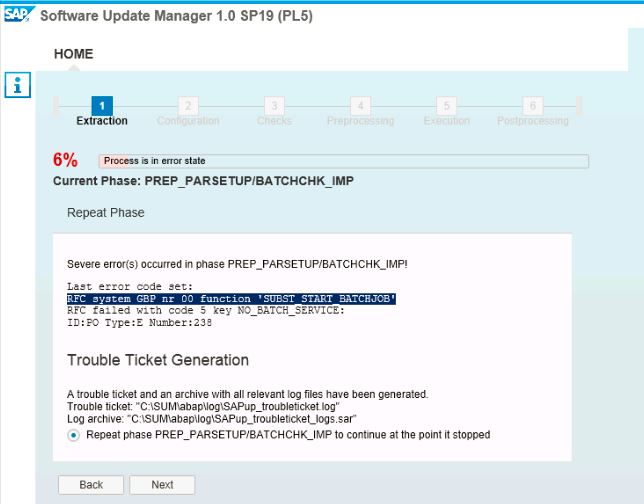
RFC system SID nr 00 function 'SUBST_START_BATCHJOB'


RFC system SID nr 00 function 'SUBST_START_BATCHJOB'


Solution:

Refer Snote:  2332405


Check the host entry file and hostname.
check sapdp00 port in service file

comment it as below and restart the server.

### tick-port       3200/udp                # Press-sense Tick Port
sapdp00       3200/tcp                 # SAP System Dispatcher Port
##sapdp00  3200/tcp
sapdp01  3201/tcp


Thanks
Yoonus
0097155 2535570


Thursday, August 27, 2015

SQL error 1732 when accessing table "PROGDIR".

Category               Installation Errors
Runtime Errors         DBIF_RSQL_SQL_ERROR
Except.                CX_SY_OPEN_SQL_DB
Date and Time          27.08.2015 20:37:59


 Short text
     SQL error 1732 when accessing table "PROGDIR".


 What happened?
     Error Text of the Database: "ORA-01732: data manipulation operation not legal
      on this view"


 What can you do?
     Note which actions and input led to the error.

     For further help in handling the problem, contact your SAP administrator
     .

     You can use the ABAP dump analysis transaction ST22 to view and manage
     termination messages, in particular for long term reference.

     Note which actions and input led to the error.
     For further help in handling the problem, contact your SAP administrator
     .

     You can use the ABAP dump analysis transaction ST22 to view and manage
     termination messages, in particular for long term reference.


Solution


Please reset Oracle parameter _simple_view_merging as it is not needed
at your system.
SQL>alter system reset "_simple_view_merging";
 
SAP note: 1431798 - Oracle 11.2.0: Database Parameter Settings


Thanks
Yoonus

Monday, July 13, 2015

BR0301E SQL error -942 at location db_connect-6, SQL statement:'SELECT NAME FROM V$DATABASE WHERE ROWNUM = 1'ORA-00942: table or view does not exist


Error after Upgrade or System copy:

C:\Users\gpdadm>brconnect -u / -c -f stats -t all -f collect -p 4
BR0801I BRCONNECT 7.20 (36)
BR0805I Start of BRCONNECT processing: ceqyckdt.sta 2015-07-13 12.02.33
BR0484I BRCONNECT log file: E:\oracle\GPD\sapcheck\ceqyckdt.sta
BR0280I BRCONNECT time stamp: 2015-07-13 12.02.34
BR0301E SQL error -942 at location db_connect-6, SQL statement:
'SELECT NAME FROM V$DATABASE WHERE ROWNUM = 1'
ORA-00942: table or view does not exist
BR0310E Connect to database instance GPD failed
BR0280I BRCONNECT time stamp: 2015-07-13 12.02.34
BR0301W SQL error -942 at location brc_dblog_open-1, SQL statement:
'INSERT INTO SAP_SDBAH (BEG, FUNCT, SYSID, OBJ, RC, ENDE, ACTID, LINE) VALUES ('
20150713120233', 'sta', 'GPD', 'ALL', '9999', ' ', 'ceqyckdt', '7.20 (36)')'
ORA-00942: table or view does not exist
BR0324W Insertion of database log header failed

BR0806I End of BRCONNECT processing: ceqyckdt.sta 2015-07-13 12.02.34
BR0280I BRCONNECT time stamp: 2015-07-13 12.02.34
BR0804I BRCONNECT terminated with errors


Solution:

Solution:

SQL> grant sapconn, unlimited tablespace to PSAPSR3
  2  ;
grant sapconn, unlimited tablespace to PSAPSR3
                                       *
ERROR at line 1:
ORA-01917: user or role 'PSAPSR3' does not exist


SQL> grant sapconn, unlimited tablespace to SAPSR3;
Grant succeeded.
SQL> COMMIT;
Commit complete.
SQL> grant sYSTEM, unlimited tablespace to SAPSR3;
grant sYSTEM, unlimited tablespace to SAPSR3
      *
ERROR at line 1:
ORA-01919: role 'SYSTEM' does not exist


SQL> grant sysdba, unlimited tablespace to SAPSR3;
Grant succeeded.
SQL> commit;
Commit complete.
SQL>


SQL> grant sysoper to sapsr3;
Grant succeeded.
SQL> grant sapconn to sapsr3
  2  ;

Grant succeeded.
SQL> grant sapdba to sapsr3;
Grant succeeded.
SQL> alter user SAPSR3 default role all;
User altered.
SQL> select grantee, granted_role, default_role
  2        from dba_role_privs
  3         where grantee = 'SAPSR3';

GRANTEE                        GRANTED_ROLE                   DEF
------------------------------ ------------------------------ ---
SAPSR3                         SAPCONN                        YES
SAPSR3                         SAPDBA                         YES

SQL> select * from session_roles;
no rows selected
SQL>

 ====================================================================
D:\usr\sap\GPD\SYS\exe\NTAMD64>sqlplus /nolog @sapdba_role  SR3
SQL*Plus: Release 11.2.0.3.0 Production on Thu Apr 23 19:29:19 2015
Copyright (c) 1982, 2011, Oracle.  All rights reserved.
Disconnected from Oracle Database 11g Enterprise Edition Release 11.2.0.3.0 - 64
bit Production
With the Partitioning, OLAP, Data Mining and Real Application Testing option

D:\usr\sap\GPD\SYS\exe\NTAMD64> sqlplus /nolog @sapdba_role SAPSR3


sqlplus /nolog @sapconn_role.sql SR3
sqlplus /nolog @sapconn_role.sql SAPSR3


Symptom
If database accesses are performed using the database tools BRBACKUP, BRARCHIVE, BRCONNECT, and BRSPACE, the relevant authorizations are missing.

BRBACKUP fails with the following error messages, for example:
BR0051I BRBACKUP 7.00 (20)
BR0055I Start of database backup: bddzbuxf.ant 2009-11-10 10.12.35
BR0280I Time stamp 2009-11-10 10.12.36
BR0301W SQL error -1031 at location BrLicCheck-7
ORA-01031: insufficient privileges
BR0301W SQL error -942 at location BrbDbLogOpen-1
ORA-00942: table or view does not exist
BR0324W Insertion of database log header failed
BR0280I Time stamp 2009-11-10 10.12.37
BR0301E SQL error -1031 at location BrCntrlCopy-1
ORA-01031: insufficient privileges
BR0320E Copying of control file to ... failed
BR0314E Collection of information on database files failed
BR0056I End of database backup: bddzbuxf.ant 2009-11-10 10.12.37
BR0280I Time stamp 2009-11-10 10.12.37
BR0054I BRBACKUP terminated with errors
In relation to table functions, the following errors, for example, can occur in SAP Release 7.40 SP10 or above:
BR0301E SQL error -1031 at location stats_tfun_update-2, SQL statement:
'BEGIN SAP091.UCONRFC_ATTRG (0, 1); END;'
ORA-01031: insufficient privileges
ORA-06512: at "SAP091.UCONRFC_ATTRG", line 1
ORA-06512: at line 1
BR1867E Updating statistics failed for table function SAP091.UCONRFC_ATTR

Other Terms
SAPDBA role, BR*Tools

Reason and Prerequisites
1. You did not create the SAPDBA role during an SAP/Oracle upgrade, as outlined in the upgrade instructions.
2. You use one of the tools mentioned above in a lower SAP release and the database authorizations have not been adjusted.
3. The database grants were deleted.

Solution
Download the SQL script for creating the SAPDBA role from the attachment to this SAP Note (for Oracle 10g: sapdba_role_ora10, for Oracle 11g: sapdba_role_ora11, and for Oracle 12c: sapdba_role_ora12 ). Execute this script as follows (sapdba_role.sql in the current directory):

sqlplus /nolog @sapdba_role <SAPSCHEMA_ID>

Where <SAPSCHEMA_ID> is the schema ID of the SAP database user:
- for User SAPR3:      R3
- For the user SAPSR3:     SR3
- for User SAP<SID>:   <SID>
- for User SAP<SID>DB: <SID>DB

Sample call for a standard installation with the schema SAPSR3:

sqlplus /nolog @sapdba_role SR3

and with the schema SAPR3:

sqlplus /nolog @sapdba_role R3

The log file sapdba_role.log is created in the current directory.

Note 1:
----------
The schema ID is not to be confused with the schema name. Therefore, the following call is incorrect:
sqlplus /nolog @sapdba_role SAPSR3

Caution 2
----------
For MCOD systems, the script must be executed for all SAP schemas, for example, for ABAP schemas and Java schemas in a database:
sqlplus /nolog @sapdba_role SR3
sqlplus /nolog @sapdba_role SR3DB

Caution 3
----------
Since non-ABAP systems/schemas (a pure SAP J2EE database, for example) do not contain all of the tables mentioned in the SAPDBA role, the log file will contain error messages, for example:
grant ALL on SAPSR3DB.DBAML to sapdba
                      *
ERROR at line 1:
ORA-00942: table or view does not exist

You can ignore these error messages.


Thanks
Yoonus